

I’ve been continuing to practice rigging in Adobe Character Animator, which reads character files from Photoshop (or Illustrator). I strongly prefer drawing in Procreate, though, so after I finish my artwork I bring everything into Photoshop and reorganize the layers so Character Animator can read them properly. It’s a bit tedious, but that’s the tradeoff for getting to draw in the program I enjoy most.
This is my current process for how I have been organizing my files in PS, for rigging my characters. However, I am continuing to take classes so we will see if this changes in the future. I have learned something a bit more with each character/rig.
First: One Master Folder
Everything starts with a single folder that holds the entire character. I label it +Character Name.
Next: The Frontal Folder
Inside the character folder, I create a folder called Frontal. When I bring the file into Character Animator, this folder gets rigged as the head (more on that later).
Finally: Head and Body Split
Inside the Frontal folder, I add two more folders:
- +Head
- Body
The Head folder contains everything that needs to move, rotate, blink, lip-sync, or track to the camera. Eyes, pupils, eyebrows, mouth shapes—if it emotes, it lives here.
The Body folder holds the rest: torso, arms, legs, clothing—anything that doesn’t need facial tracking but still needs to behave correctly in Character Animator.
Does this work?
Yes—and no.
It’s working better than my previous system, and my characters are moving a bit more naturally. That said, it’s far from perfect. I’m still learning, and this setup will probably evolve. Until I find something better, though, this is the system.
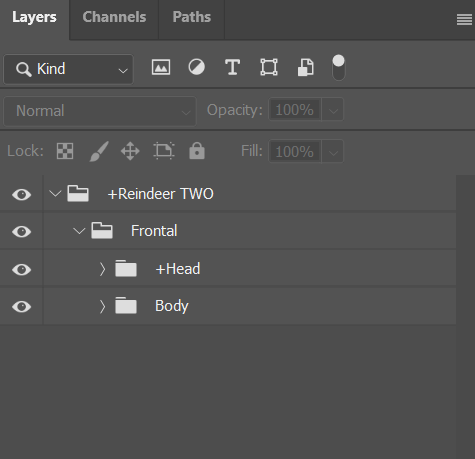
- + Your Character
- Frontal Folder
- +Head
- Body
“I made tons of films. I did animation for my friends’ films. I animated scenes just for the fun of it. Most of my stuff was bad, but I had fun, and I tried everything I knew to get better.”
– Pete Docter
I will continue to break down each step in this process as I progress. Until next time.


 nikolaidesigns.com